Easy Piano Keyboard - Piano88
- 4.7
- Rating
- 10.00M
- Installs
- Free
- Price
 Analysis by App-foxy
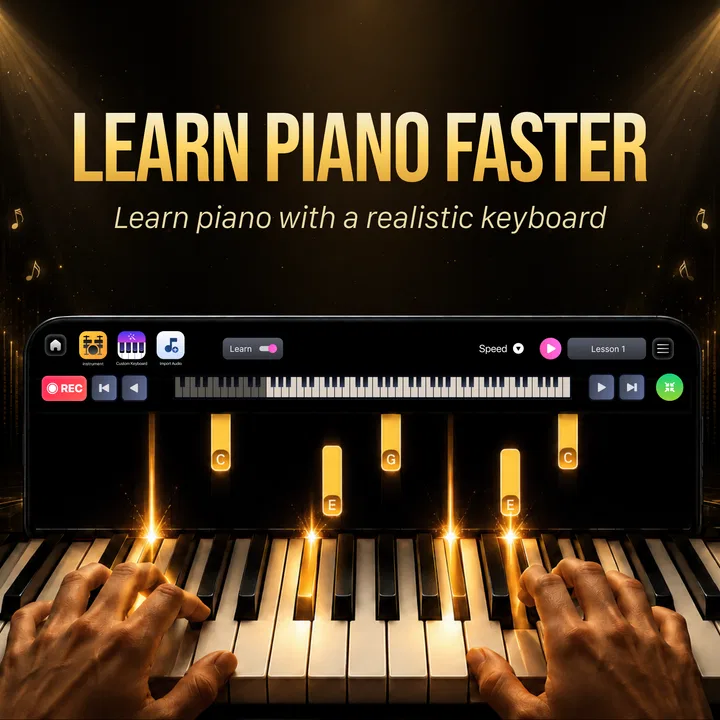
Easy Piano Keyboard - Piano88 is the kind of music app that wins you over quickly: you tap a key, hear an immediate note, and feel that you have turned a spare minute into a tiny practice session. I found that first contact genuinely enjoyable because it removes the ceremony around playing piano. There is no need to sit at a full instrument, find a quiet room, or remember where you left your sheet music. With Banix Studio’s app, the phone becomes a compact keyboard for casual playing, musical exploration, and short practice bursts.
That instant appeal is also the reason I would not judge it only by the first few minutes. A piano app can be entertaining on day one and forgotten by the end of the month. My main question was whether this particular keyboard could become a useful habit rather than another novelty sitting on a home screen. The answer is positive for some users, especially beginners and people who want an uncomplicated way to touch the piano regularly, but it depends heavily on what you expect from a phone-sized instrument.
What the first week feels like
The first week is where Easy Piano Keyboard - Piano88 makes its strongest impression. The straightforward layout encourages experimentation instead of making a new user study a complicated interface. I could open it when I had a few minutes and begin pressing keys immediately. That matters because the biggest obstacle to casual practice is often setup time. A full piano, even a digital one, asks for more commitment than many people have during a lunch break or before bed.
You May Also Like

 Blood Strike: 2.5 Anniversary
Blood Strike’s Loadouts Turn Every Drop Into a Tactical Gamble
A close look at Blood Strike’s custom loadouts: how fast access to signature weapons reshapes its battle royale rhythm, rewards preparation, and narrows the gap between fights.

 Pandora - Music & Podcasts
Pandora’s Music Is Easy to Start, but Harder to Recover
Pandora’s strength is its low-effort path from a seed to a station. Its weak spot is how much confidence it asks you to place in connection, setup, and quiet recovery.

 8 Ball Pool
 Is Built on Rivalries, Rematches, and Routine
A close look at the rivalries, rematches, shared routines, and unanswered safety questions that turn a quick pool match into a persistent mobile community.

 Samsung Music
’s Quiet Strength Is Playing What You Already Own
Its reach comes less from spectacle than from dependable access to a personal library. That simplicity is both the app’s strongest retention engine and its ceiling.

 AccuWeather: Weather Radar
AccuWeather Review: A Quick, Clear Forecast for Everyday Decisions
For everyday plans, the best forecast is the one you can understand quickly. AccuWeather makes rain timing, radar, and local conditions easy to act on, with a few trade-offs.

 Hill Climb Racing
Why Hill Climb Racing Still Turns Crashes Into One More Run
A tiny car, a bumpy hill and one more upgrade: Hill Climb Racing keeps resurfacing because its simple chaos makes every near-miss feel personal.
More From Our News Desk



I think the app is particularly approachable for someone who has never learned keyboard basics. You can start by finding notes, trying simple melodies by ear, or repeating a short pattern until your fingers become more comfortable. It is not necessary to treat every session as formal training. In my experience, that freedom makes the first encounters less intimidating than a lesson-focused tool that constantly reminds you what you should be doing next.
A realistic use case is a commuter who wants to keep a musical interest alive without carrying an instrument. During a quiet break, that person can open the app, work through a familiar tune from memory, and close it again without needing a dedicated practice block. Another good fit is a parent who wants to let a child explore sounds under an Everyone content rating. The phone is already familiar, and the keyboard gives the child something more active to do than simply watch a music video.
The first-week benefit is not limited to beginners. I also found value in using a virtual keyboard as a quick idea pad. If a melody appears while I am away from a piano, tapping a few notes can help me decide whether the idea is worth remembering. This is a modest use case, but it is one of the most practical. The app does not need to replace an instrument to be useful; it only needs to be available at the moment inspiration arrives.
Where the phone format helps
A touchscreen keyboard has a different personality from a physical piano. It is portable, quiet in the practical sense that it does not require a large instrument, and easy to reopen. It also lowers the emotional cost of making mistakes. When I play a wrong note on a phone, I am more willing to experiment because the session feels temporary and private. That makes the app a comfortable entry point for people who are curious about piano but nervous about formal lessons.
The compact format can also support a useful “micro-practice” routine. Instead of promising yourself a long session and then skipping it, you can set a small personal goal: locate a group of notes, repeat a short phrase, or test a melody you heard earlier. The important insight is that the app works best when the target is deliberately small. Treating it as a complete substitute for regular keyboard practice creates expectations the touchscreen cannot comfortably meet.
Easy Piano Keyboard - Piano88 is free to start, which makes that first experiment easier to justify. Optional in-app purchases range from $1.49 to $19.99 per item, so I would approach paid extras as something to evaluate only after deciding that the basic experience fits your routine. I would not buy anything immediately just because the opening session is pleasant. The real test is whether you still reach for the keyboard after the initial curiosity has passed.
What I would test before committing
During the opening sessions, I recommend checking how naturally your hands fit the visible keys and whether you can play without constantly looking down. A phone screen is much narrower than a piano, and the difference becomes obvious when a melody moves beyond a small range. I would also test the app in the place where you are most likely to use it. A keyboard that feels comfortable at a desk may feel cramped when held in one hand on a sofa.
Another useful test is to play the same short phrase several times, first slowly and then with more confidence. This reveals whether the touchscreen responds in a way that supports your timing or whether accidental touches interrupt the flow. That distinction matters more than a quick demonstration. A casual player may tolerate occasional awkwardness, while someone trying to build finger memory will notice it repeatedly.
Whether it earns a place after the novelty
After the first month, the app’s value becomes less about the excitement of hearing notes and more about the routine you create around it. I would describe Easy Piano Keyboard - Piano88 as a lightweight practice companion rather than a complete piano-learning system. It can help maintain contact with melodies and basic keyboard familiarity, but it will not automatically provide the structure, correction, or physical response that a teacher, full keyboard, or dedicated course can offer.
That does not make it disappointing. It simply means the app has to be assigned the right job. I found it most sustainable when I used it for short, clearly defined activities. For example, I might spend a few minutes working out the opening of a tune by ear, then stop before the session becomes repetitive. Another day, I could use it to revisit a pattern I had already discovered. These small sessions create recurring value because they are easy to repeat and do not demand a major change to the day.
For a learner, the app can serve as a low-pressure place to reinforce recognition. You can use it to become more familiar with the arrangement of piano notes and to connect what you hear with what you tap. The benefit is strongest when you already have an external goal, such as remembering a simple melody or preparing for time at a real keyboard. Without that goal, the experience may drift into random tapping, which is fun briefly but less likely to build a lasting habit.
For a casual musician, the monthly value is more creative. A phone keyboard can act as a scratchpad for musical fragments. I would use it when I want to check the shape of a tune before recording an idea elsewhere. The trade-off is that a scratchpad is only useful if you develop a way to preserve what you discover. Since the app itself should not be treated as a full composition workflow, I would note promising ideas immediately using whatever separate method I already trust.
Who will keep using it
The strongest long-term audience is made up of beginners, occasional players, and people who want a convenient piano-like surface for quick exploration. It is also suitable for families looking for an accessible music activity, provided expectations remain realistic. The Everyone rating makes it broadly approachable, but younger users may still need guidance about handling the phone and about when tapping should stop.
I would be more cautious recommending it to an advancing pianist who needs realistic key resistance, accurate hand spacing, pedal technique, or detailed performance control. A touchscreen cannot reproduce the physical feedback of an acoustic or digital piano. If your goal is to improve dynamics, develop serious repertoire, or prepare for an assessment, a real keyboard and a structured learning resource would be the better investment.
It is also not the right choice for someone who wants a full music-production environment. A piano keyboard app can help generate a note idea, but that is different from arranging tracks, editing recordings, or managing a finished composition. Choosing it for those tasks would lead to frustration because its strength is immediate playability, not a broad studio workflow.
How it compares with usual alternatives
Compared with a physical keyboard, Easy Piano Keyboard - Piano88 wins on availability and loses on touch. A real instrument gives you a wider playing area, more convincing response, and a clearer path toward proper technique. The phone app wins when the alternative is not playing at all. Ten minutes with a convenient virtual keyboard can be more valuable than an excellent instrument that remains unused because it is difficult to access.
Compared with lesson-oriented piano apps, this one feels more open-ended. A guided course may be better if you need a curriculum, scheduled exercises, progress checks, or motivation from a sequence of lessons. Easy Piano Keyboard - Piano88 is better suited to self-directed exploration. I prefer it when I already know what I want to try and do not want an instructional layer between me and the keys.
Compared with simply searching for piano videos, the app is more interactive. A video can demonstrate a melody, but it does not give your fingers a surface on which to test the notes immediately. On the other hand, videos may explain rhythm and technique more clearly. In practice, the two approaches can complement each other: use a lesson or demonstration for understanding, then use the phone keyboard for a quick repetition session.
Maintenance, fatigue, and everyday friction
The maintenance burden is low in one sense: there is no physical instrument to tune, clean, or make room for. The app is free to install and supports devices running Android 6.0 or later, which keeps it accessible to many phone users. Its current version is 6.6, and the product has been available since June 25, 2024. Those details make it a practical option for someone using an older compatible device rather than upgrading hardware just to experiment with piano.
Still, low maintenance does not mean zero friction. The first burden is remembering to use it. A virtual keyboard has no physical presence in the room, so it cannot remind you to practice in the way an instrument sitting in a corner can. I would place it somewhere easy to reach on the phone and connect it to an existing routine, such as a short break or a wind-down period. The habit needs a cue because the app will otherwise compete with every other distraction on the device.
The second burden is screen comfort. Extended sessions on a phone can make the experience feel cramped, especially if you are trying to play with both hands or move across a wider range. I found that short sessions are much more pleasant than ambitious ones. A useful rule is to stop when the activity changes from musical exploration into repeated correction of finger placement. At that point, switching to a larger keyboard is not failure; it is choosing the right tool.
Touchscreen fatigue is another issue. The surface gives less physical information than real keys, so you may need to watch your fingers more closely. That visual attention can become tiring even when the music itself is enjoyable. Beginners may not mind this at first, but repeated sessions can expose the limitation. If your main goal is to build automatic finger movement, use the app for note familiarity and ideas, then transfer the practice to a physical keyboard whenever possible.
What can make sessions feel repetitive
The novelty fades when every session follows the same pattern: open the keyboard, tap random notes, smile at the sound, and close it. To avoid that loop, I would give each visit a specific question to answer. Can I find the next note of a melody without guessing? Can I repeat a phrase at a steadier pace? Can I remember the pattern after a short pause? These challenges turn the app from a toy into a small practice surface without pretending it is a full course.
Another source of fatigue is the gap between what you hear in your head and what your fingers can comfortably reach on the screen. That gap is normal for a phone keyboard, but it can be discouraging if you expect the same freedom as a full instrument. I recommend treating the visible range as a creative constraint. Work within it, simplify a melody, or use the app to test only the central idea. If the arrangement demands broader reach, move to a real piano rather than forcing the phone to do something it was not designed to do.
Optional purchases may also affect the long-term feeling of the app. Because individual items can cost from $1.49 to $19.99, I would keep spending tied to a clear need rather than impulse. The free starting point is enough to decide whether the keyboard belongs in your routine. If you find yourself using it consistently, then consider whether a paid item genuinely improves the activities you already enjoy. If not, staying with the free experience is the more sensible choice.
Practical ways to get recurring value
Use a short melody as a weekly checkpoint. Try it slowly, then return later and see whether locating the notes feels more natural. This gives the app a sense of progress without requiring formal scoring.
Keep sessions purposefully narrow. One phrase, one note-finding exercise, or one musical idea is enough. Ending while the activity is still enjoyable makes it easier to return.
Pair the app with a physical instrument when available. Use the phone for recall and experimentation, then use the larger keyboard for technique, range, and expressive control.
Use headphones or a quiet setting when you need concentration, but do not turn every session into a performance test. The app is most useful when it remains easy to open and easy to leave.
These habits address the central weakness of a simple piano app: it cannot create purpose for you. It can make playing available, but the lasting benefit comes from bringing a small intention to each session. That is also why I would recommend it more strongly to a curious beginner than to someone waiting for an app to provide a complete learning plan.
My long-term verdict
Easy Piano Keyboard - Piano88 earns lasting space on my phone when I treat it as a convenient musical side tool, not as a replacement for a piano or a structured teacher. Banix Studio has made something approachable enough for quick experiments and regular micro-practice. Its average rating of 4.5 from around 26 thousand ratings and more than 10 million installs suggest that the simple idea has found a substantial audience, but my recommendation rests more on how well its role matches your habits than on popularity alone.
I would recommend it to someone who wants to try piano without a major commitment, to a casual player who needs an always-available keyboard, or to a learner who wants extra contact with notes between more serious practice sessions. The free entry point makes it easy to test, and the Everyone rating keeps the app suitable for a broad household audience. Just remember that a phone screen is a compromise: convenient, immediate, and portable, but limited in range, touch, and technique.
I would skip it if you want detailed instruction, realistic piano response, advanced composition tools, or a substitute for a full-size instrument. In those cases, a dedicated learning app, digital piano, or traditional lesson will serve you better. I would also skip paid extras until the basic keyboard has survived your first burst of enthusiasm and become part of your actual routine.
My final view is that the app’s recurring value comes from reducing the distance between “I want to play” and actually touching a key. That is a small advantage, but a meaningful one. If you build a simple habit around it, Easy Piano Keyboard - Piano88 can remain a useful musical pocket companion after the novelty fades. If you expect it to teach everything, replace a real piano, or supply motivation on its own, its limitations will become obvious quickly.
FAQs for Easy Piano Keyboard - Piano88
01What features does Easy Piano Keyboard - Piano88 offer?
Easy Piano Keyboard - Piano88 provides a comprehensive set of features designed for both beginners and advanced players. It includes a range of instruments, sound effects, and customizable keyboard layouts. Users can also access sheet music, record their sessions, and utilize the app's learning mode to improve their skills.
02Is Easy Piano Keyboard - Piano88 suitable for beginners?
Absolutely. Easy Piano Keyboard - Piano88 is tailored for beginners with its intuitive interface and step-by-step tutorials. It offers guided lessons that cover the basics of piano playing, making it an excellent starting point for those new to the instrument. The app also provides feedback to help users improve their technique.
03Can I use Easy Piano Keyboard - Piano88 without an internet connection?
Yes, Easy Piano Keyboard - Piano88 can be used offline, making it convenient for users who want to practice on the go without worrying about data usage. However, some features like downloading new sheet music or accessing online tutorials may require an internet connection.
04What devices are compatible with Easy Piano Keyboard - Piano88?
Easy Piano Keyboard - Piano88 is available for both Android and iOS devices. It is optimized to work smoothly on smartphones and tablets, ensuring a seamless experience across all platforms. Users should check the app's compatibility with their specific device model and operating system version before downloading.
05Are there in-app purchases or ads in Easy Piano Keyboard - Piano88?
The app offers a free version with basic features, supported by ads. For an ad-free experience and access to premium content, users can opt for in-app purchases. These may include additional instruments, advanced lessons, and exclusive sheet music, providing an enriched learning experience for dedicated users.
Pros
- User-friendly interface for beginners.
- Wide range of sound options available.
- Customizable keyboard layouts.
- Offline mode for practice anywhere.
- Regular updates with new features.
Cons
- Limited advanced features for professionals.
- Ads can be intrusive during use.
- Requires in-app purchases for full access.
- Occasional lag on older devices.
- No MIDI support for external keyboards.

Easy Piano Keyboard - Piano88
Gallery